Agent approval processes
In government and finance, installing an agent on every server needs long approvals, and monitoring waits.
SSM Server monitoring
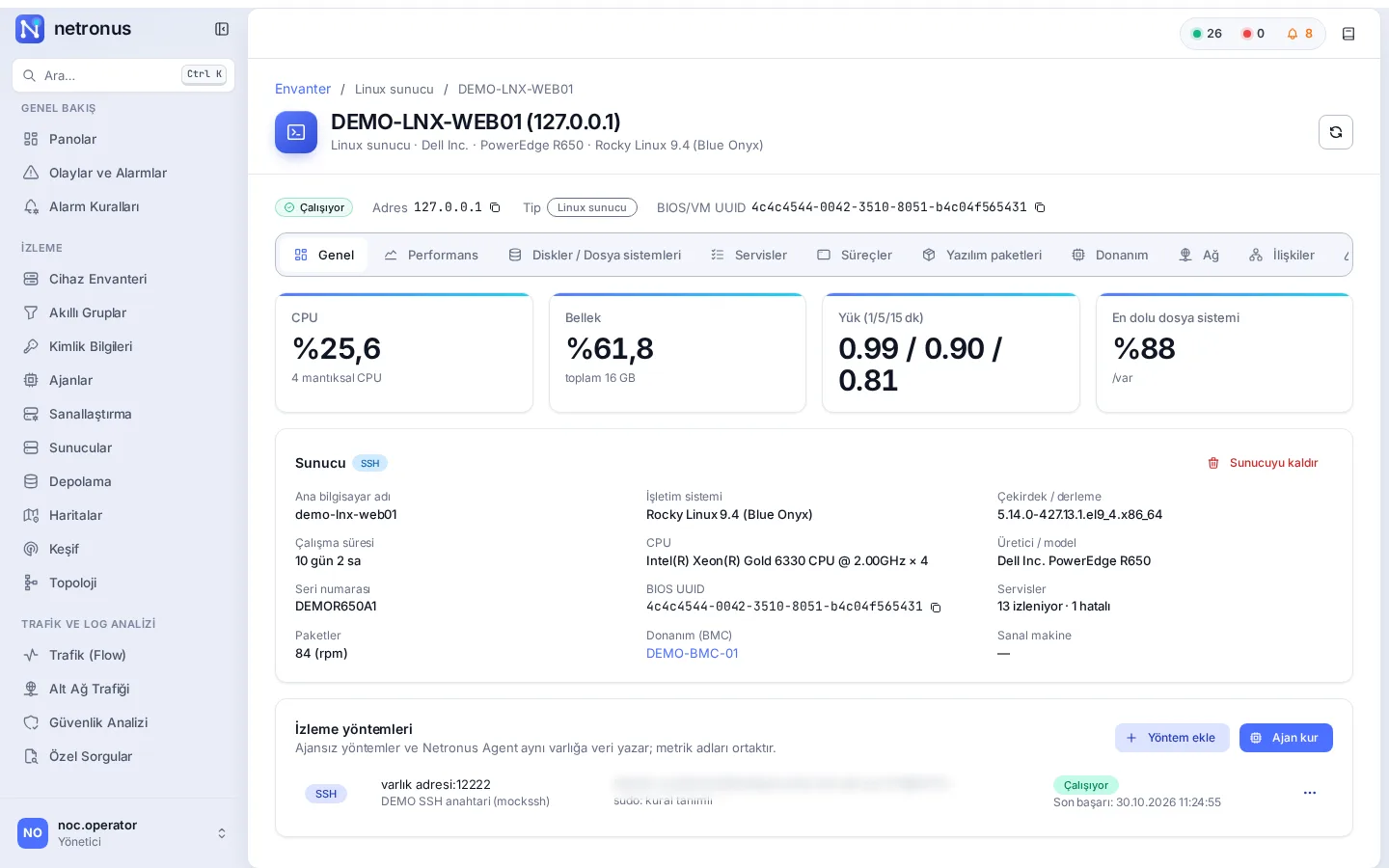
Netronus monitors Linux and Windows servers and their hardware on one screen. Agentless over SSH, WinRM, SNMP and Redfish where an agent cannot be installed; with the lightweight Netronus Agent where you need detail. When you move to the agent later, the same asset is enriched and its history and alarm rules are kept.

The problem
In government and finance, installing an agent on every server needs long approvals, and monitoring waits.
Ping and basic SNMP do not show service state, processes, installed packages or disk health.
Agents that use hundreds of MB of memory and wait for inbound connections raise both resource and security concerns.
The solution
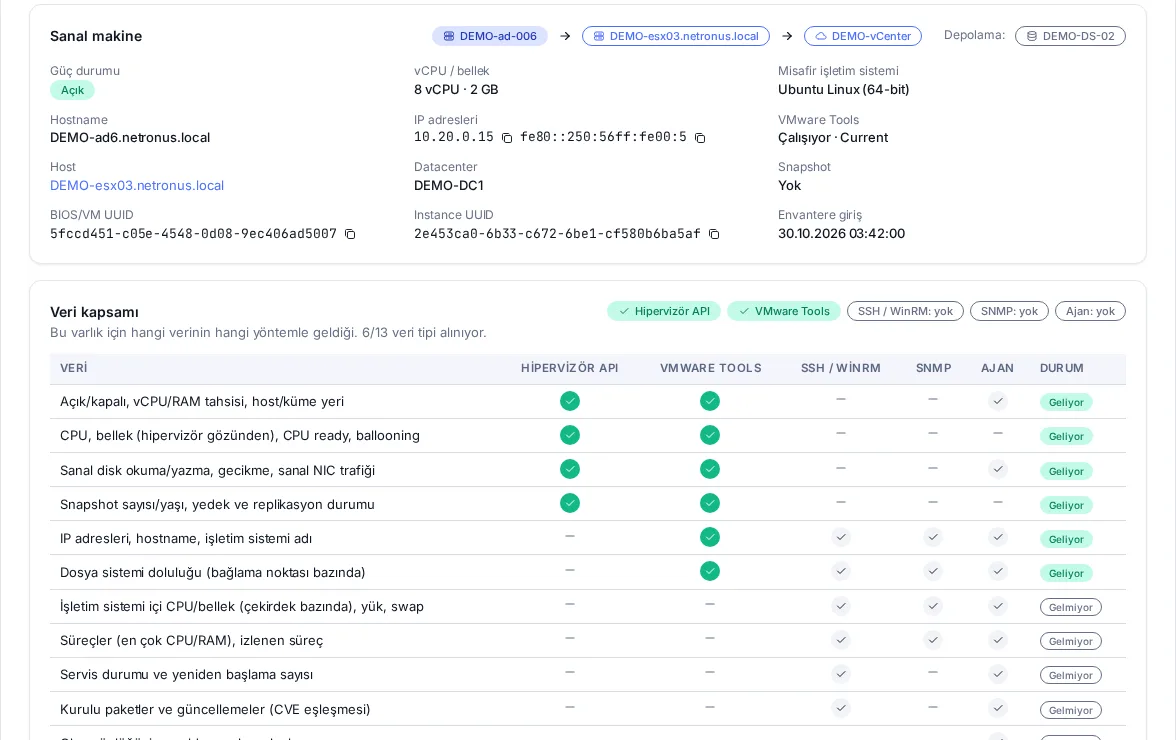
Choose the method each server needs and combine several if you like. Agentless and agent-based collection write to the same metric dictionary, so dashboards, alarms and reports do not care where the data came from. The Data coverage card on the asset page shows which data is arriving and what needs an agent or SSH/WinRM credentials.
Nothing to install on the server
In-depth, from inside the OS
Upgrade any asset to the agent later; history and alarm rules are kept.
Capabilities
Measured footprint: about 20 MB of memory and about 0.1% of one CPU core (default profile, one-minute collection).
The agent does not listen; it only makes outbound connections. Enrollment uses a one-time token, everything after that is mutual TLS (mTLS).
When the server is unreachable the agent buffers data on disk and sends it in order once the connection is back, so charts have no gaps.
Per-core CPU, memory, load, disk and network I/O, file systems, top processes, services and restart counts.
SMART, mdraid, LVM, ZFS and multipath state; fans, power supplies, temperatures, RAID and hardware logs via Redfish.
Hardware, BIOS, serial number, installed packages and updates; versions feed CVE matching through security content.
TCP, HTTP(S), certificate expiry and local script checks, managed centrally as profiles.
Collection intervals and service and process selections are assigned as profiles and applied without restarting the agent.
For the servers you select, Netronus generates asset-bound tokens and one installer script (bash / PowerShell) to distribute with Ansible, GPO or SCCM.
An enrolling agent attaches to the existing asset by BIOS/VM UUID; no duplicate is created. While the agent is online, agentless collection pauses, so there are no double alarms.
Agent-based or agentless
Start agentless; add the agent only where you need more. Both write the same metrics, so dashboards and alarms keep working.
| Data | Agentless (SSH, WinRM, SNMP, Redfish) | Netronus Agent |
|---|---|---|
| CPU, memory, load, swap | 1 min | 10 s – 1 min |
| File system usage | ||
| Service state | + restart count | |
| Installed packages and updates | partial | |
| Top processes, watched processes | partial | |
| Fans, power supplies, temperature, RAID (Redfish) | partial | |
| SMART, LVM, ZFS, mdraid, multipath | partial | |
| Custom checks (TCP, HTTP, certificate, script) | – | |
| Local buffer during outages | – | |
| What you install | Nothing; an account and network access | One command or MSI; outbound connection only |
Screenshots
Technical summary
| Item | Detail |
|---|---|
| Agentless methods | SSH (Linux), WinRM HTTPS (Windows), SNMP v2c/v3 (HOST-RESOURCES-MIB), Redfish 1.6+ |
| Supported BMCs | Dell iDRAC 9, HPE iLO 5/6, Lenovo XClarity Controller, Supermicro X11+ |
| Netronus Agent | Linux (x86_64, arm64; RPM/DEB) and Windows (MSI, runs as a service) |
| Agent connection | Outbound only; encrypted with mTLS |
| Measured footprint | About 20 MB of memory, about 0.1% of one CPU core (default profile) |
| Sampling | Agent: 10 s – 1 min; agentless methods: 1–5 min |
| Outage buffer | On disk, size-limited; sent automatically when the connection returns |
| Licensing | Agentless and agent-based servers are counted separately; agent licenses only for the servers you want in depth |
Roadmap
These items are planned and not part of the current release.
Related
Monitor vCenter, ESXi and Proxmox VE agentless: hosts, VMs, LXC containers, datastores, snapshots, backups, Ceph and ZFS.
Explore the moduleThresholds with duration and hysteresis, rate of change, forecasts, seasonal baselines; maintenance and dependency suppression. One engine for network, servers and storage.
Explore the moduleNetApp, Dell, Pure Storage, HPE, Huawei and IBM arrays plus Brocade and Cisco MDS SAN switches; see how many days are left before a pool fills up.
Explore the moduleWe will set up a demo on your network, show the screens with your own devices and prepare a quote for the modules you need.