Hypervisor here, network there
When a VM slows down, three different tools are opened to find out whether the host, the datastore or the network is to blame.
SSM Virtualization
Add vCenter or a Proxmox cluster once: hosts, virtual machines, LXC containers and datastores are discovered automatically and join the same inventory as your network devices. Nothing is installed in the VMs; add the Netronus Agent only to the VMs where you want more detail.

The problem
When a VM slows down, three different tools are opened to find out whether the host, the datastore or the network is to blame.
Old snapshots fill datastores and failed backups go unnoticed.
When new and deleted VMs are added to monitoring by hand, the inventory never matches reality.
The solution
Netronus reads the hypervisor’s management API with a read-only account. New VMs appear on their own; deleted VMs are archived with their history kept. Because VM → host → datastore → LUN relationships are built, you can go from a VM’s page to the storage underneath it and on to the SAN port.
Relationships are discovered automatically and shown on every asset page.

Capabilities
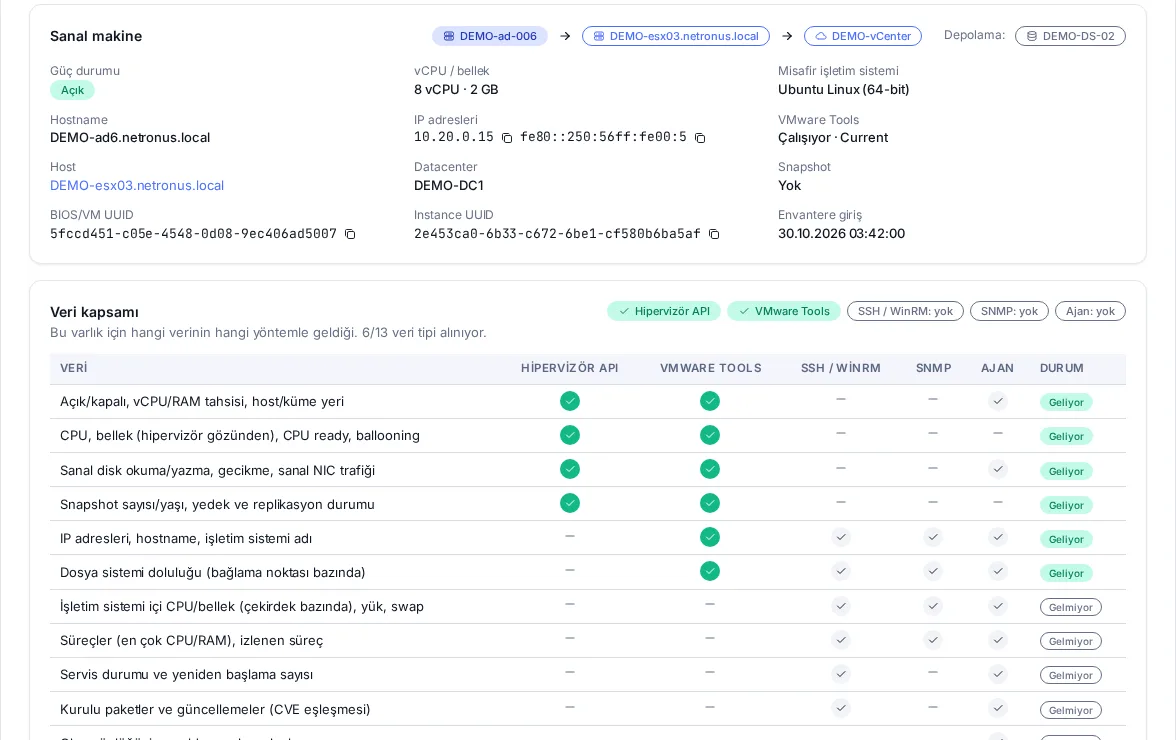
Clusters, hosts, VMs, LXC containers and datastores enter the inventory on their own; browse them as vCenter › Datacenter › Cluster › Host › VM in the tree.
CPU, CPU ready, memory, ballooning and swap, virtual disk read/write and latency, virtual NIC traffic.
Snapshot count and age; backup jobs, replication and task history on Proxmox.
VMware HA/DRS state; Proxmox quorum and HA state.
Ceph (pools, OSDs, PG state), ZFS and LVM-thin usage on Proxmox storage.
Host sensor summary, connection and maintenance state; product, version and hardware.
CPU ready, disk latency, snapshots older than 7 days, failed backups, HA errors, datastore usage, quorum loss, Ceph health and more.
Every VM page shows what comes from the hypervisor and what from the guest tools; generate the agent install command with one click if needed.
A read-only role in vCenter and an auditor (PVEAuditor) API token in Proxmox are enough.
Screenshots
Technical summary
| Item | Detail |
|---|---|
| VMware | vCenter Server and ESXi 6.7, 7.0, 8.0 (vSphere Web Services API) |
| Proxmox | Proxmox VE 7.x, 8.x (REST API; API token recommended) |
| Installation | Agentless: a read-only account on the hypervisor, nothing installed in VMs |
| Discovery | Full discovery every 5 minutes; VMware changes every minute |
| Performance | One-minute collection |
| Relationships | VM → host → cluster, VM → datastore, datastore → LUN (by NAA ID or NFS path) |
| Deleted VMs | Archived; historical metrics are kept |
| In-guest detail | With the Netronus Agent, attached to the same asset by BIOS/VM UUID |
Roadmap
These items are planned and not part of the current release.
Related
NetApp, Dell, Pure Storage, HPE, Huawei and IBM arrays plus Brocade and Cisco MDS SAN switches; see how many days are left before a pool fills up.
Explore the moduleMonitor Linux and Windows servers agentless over SSH, WinRM, SNMP and Redfish, or in depth with the lightweight Netronus Agent.
Explore the moduleContinuously monitor routers, switches, firewalls and servers over ICMP and SNMP, and alert the right people through the right channel the moment something breaks.
Explore the moduleWe will set up a demo on your network, show the screens with your own devices and prepare a quote for the modules you need.